Free ATS-Friendly Resume Templates
A resume template is a starting structure, not a design exercise. It decides which section the reader meets first, where the numbers sit, and whether the software reading your file can follow your history in order. Every template on this site is free, renders the same underlying document — standard headings, real bullet lists, selectable text — and exports to PDF or DOCX from your browser, with no account and no upload.
Free forever. No account, no card, no catch — your data never leaves your device.
The pages below are organised the way applicants actually search: by the job they are applying for, and by the shape of the document. Each page shows the template rendered with a real resume inside it, then explains the section order that role expects, what to write in each section, and how an applicant tracking system reads the layout. The previews are the same files the builder exports, not mock-ups.
How to choose a resume template
- Start with the role. A nursing resume is read for its licence and unit experience; a software resume is read for its stack and shipped projects. The role pages put those sections in the order the hiring side expects.
- If your role is not listed, choose by format. A one-page template suits most applicants under ten years in; a combination template suits career changes, employment gaps and skills that would be buried in a strict chronological list.
- Then choose the layout. Single-column layouts put every line in one text flow, which is the safest shape for older parsers. Layouts with a sidebar keep skills visible at a glance and read well to a human — most modern systems handle both, but the plain layout is the conservative choice for a large employer.
- Ignore colour until the content is right. Colour and font changes do not affect how the document parses as long as the text stays text. Recruiters scan the structure long before they notice the accent colour.
What every template here gets right
- Standard section names. Summary, Experience, Education and Skills are the headings parsers and recruiters both look for. A clever heading like “Where I Have Been” hides the information instead of organising it.
- One date format. Month and year, most recent first, on every role and every degree. Mixed date styles are the most common parsing error on otherwise clean resumes.
- Selectable text. Nothing important sits inside an image, a text box or a page header, which are the three places parsers drop content from.
- Real bullet lists. Experience entries are bullets with a subject, an action and a result — not paragraphs and not tables.
- Linear section order. Even the layouts with a sidebar keep the reading order obvious: header, summary, experience, education, skills.
- Free export. PDF and DOCX leave the browser directly. There is no watermark, no trial and nothing to cancel.
One page or two?
One page is the default for under roughly ten years of experience, and it is the only sensible option for a student or a first job. Two pages become appropriate when you are carrying enough relevant history that cutting it would cost you the interview — senior specialists, managers with a track record, academics with publications. What you should never do is pad: a two-page resume with three thin roles reads worse than one tight page. The resume length guide below covers how to decide, and the one-page template shows what to cut first.
Template previews
The layouts in this set
One preview per template set — role layouts for nursing, CNA, medical assistant, finance, sales, teaching, engineering and more, plus the one-page, combination and ATS-friendly formats. Every layout is free and exports to PDF or DOCX.
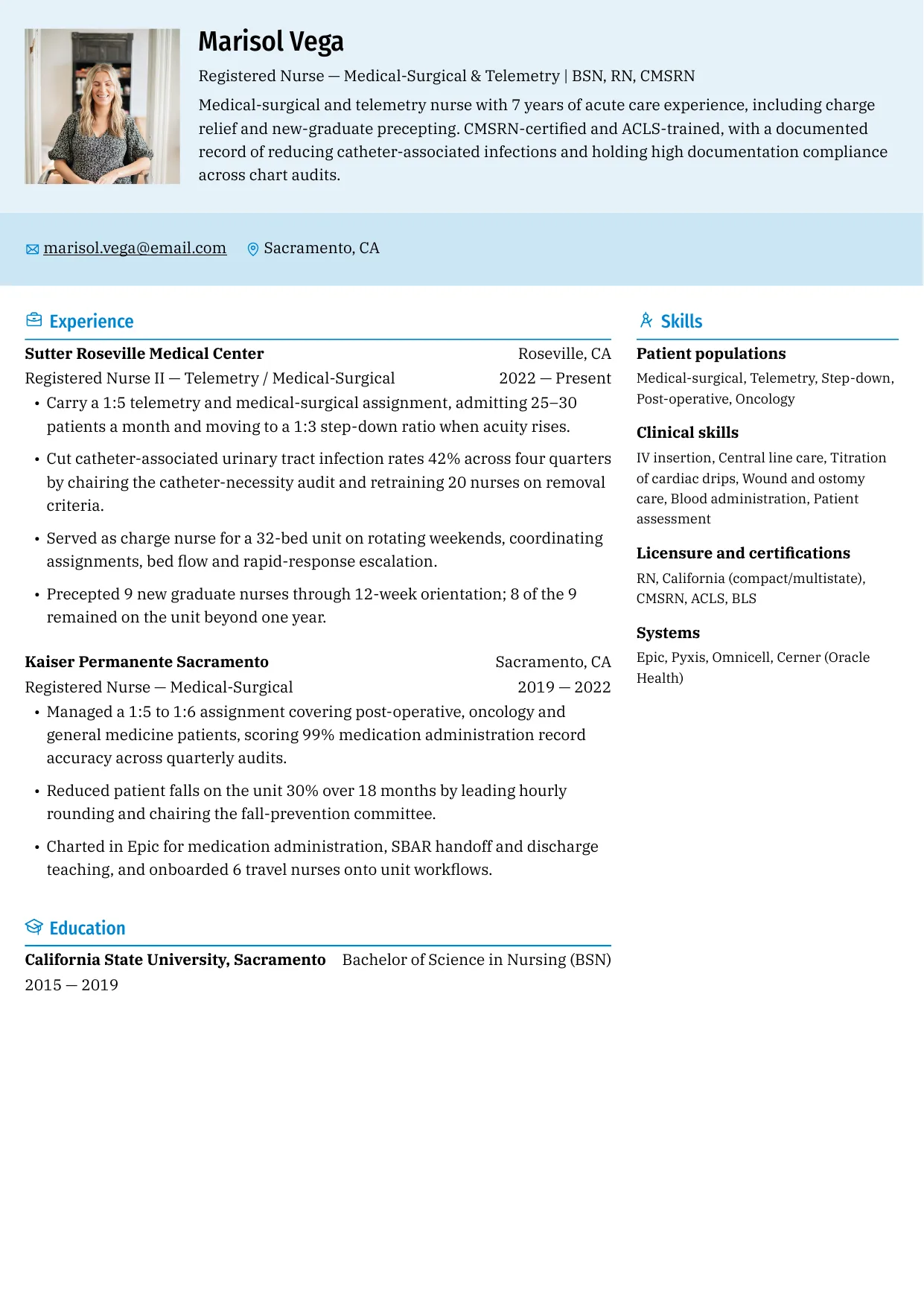
Showing 8 of 15 free templates — open the builder to browse every layout. All 15 are free.
A template is a structure, not a finished resume
- Replace every example line. The text inside a template is placeholder copy. A recruiter who reads “Senior Financial Analyst — FP&A” on an application for a warehouse role has stopped reading.
- Keep the skeleton. The section order, the heading names and the bullet format are the parts that do the work. Move a section only when the role page gives you a reason.
- Retarget the summary and the skills list to each posting. Those are the two blocks that decide whether a keyword scan finds a match, and they are the fastest blocks to edit.
- Proof the export, not the editor. Open the PDF and check that the page breaks fall where you expect, that the email link works and that no line is orphaned at the top of page two.
- Name the file properly. Firstname-Lastname-Resume.pdf. A file called resume-final-v3.docx is a small signal that nobody checked.
Formatting that quietly breaks a resume
- Putting the phone number, email or licence number in the page header or footer — parsers often skip both regions entirely.
- Using tables for layout, which can reorder cells when the text is extracted; a skills grid built from a table may come out scrambled.
- Typos in the contact block, which cost you the callback before any human sees the experience section.
- Writing dates as months only (“2022 – 2024”) so a parser cannot compute tenure, or leaving an unexplained gap that a one-line note would have covered.
- Exporting to an image-based PDF, which turns the whole document into a picture no parser can read.
None of these are writing problems, which is why a template fixes most of them before you type a word. ShitResume runs entirely in the browser: the resume you build stays on your device, every template is free, and the PDF or DOCX export is generated locally rather than uploaded to a server.
Skills and keywords for this role
Use the terms that genuinely describe your work — an interviewer will ask about anything you list.
- Pick by role first: nurse, CNA, medical assistant, finance, software engineer, student
- Pick by format when the role has no page yet: one page, combination, or the role guides by title
- Sections every template holds: header, summary, experience, education, skills
- Dates: month and year on every entry, most recent first, no month-only ranges
- Headings: keep the standard names — Summary, Experience, Education, Skills
- Export: PDF for applications, DOCX only when a portal asks for an editable file
Frequently asked questions
Are these resume templates really free?
Yes. Every template is free to use, edit and export, including the PDF and DOCX downloads. There is no account, no card and no trial that expires — the builder runs in your browser and the files are generated on your device.
Are the templates ATS-friendly?
They are built to be readable: standard section headings, selectable text, one date format and real bullet lists, with no content locked inside images or text boxes. No template can promise an outcome, and the conservative choice for an older portal is a single-column layout, which this set includes.
Which resume template should I use for my job?
Start from the role page — nurse, CNA, medical assistant, finance, software engineer or student — because each one shows the section order that role is read for. If your role is not listed, use the one-page template for under ten years of experience and the combination template for a career change or a gap.
Can I use a template for a one-page resume?
Every layout here fits one page at typical content lengths, and the previews show complete one-page documents. To stay on one page, give your current role three or four bullets, older roles two, group the earliest jobs into a single line, and drop references and hobbies entirely.
Can I change the colours and fonts?
Yes — colour, font and spacing are all editable before you export. Two rules: keep the body text at 10.5–12pt so it stays readable when printed, and check the document in greyscale if the employer may print it, since a pale accent colour can make headings disappear.
Should I send a PDF or a DOCX?
Send the PDF unless the posting asks for an editable file. The PDF locks the layout so the reader sees what you designed, and it keeps selectable text. Keep the DOCX for portals that parse Word files directly and for recruiters who say they will edit it.