ATS-Friendly Resume Template
An applicant tracking system does not judge your experience — it extracts it. Names, dates, employers, job titles and skills are pulled out of the file and dropped into fields, and whatever the parser cannot read simply does not exist for the recruiter searching the database. This ATS-friendly resume template is built around that fact: one reading column, standard section names, real bullet lists and selectable text, with no content locked inside images or text boxes.
Free forever. No account, no card, no catch — your data never leaves your device.
Most resume advice about tracking systems is either folklore or a sales pitch. What is actually true is narrower and more useful: a parser reads the text layer of your file, in the order it appears, and maps what it finds onto an application form. Anything that breaks the text layer — a table, a text box, a chart, a scanned page — either disappears or arrives scrambled. That is the whole problem this template solves, and it is why the layout stays deliberately plain.
What makes a resume template ATS-friendly
- One reading column. The main history sits in a single column so that dates, titles and employers cannot be reordered during extraction.
- Standard section names. Summary, Experience, Education and Skills are recognised by name; a heading like “My Story” gives the parser nothing to attach the content to.
- Real bullet lists. Each achievement is a text bullet, not a shape, an icon or a line of dashes drawn in a design tool.
- Selectable text. If you can highlight a sentence in the exported file, a parser can read it, and if you cannot, neither can a recruiter's search.
- Honest dates. Month and year on every entry, in the same format, so tenure can be calculated without guessing.
- Plain contact details. Email and phone written as text in the body, because header and footer regions are commonly skipped.
Section order an ATS reads reliably
- Header: name, target title, city and state, phone, email — all as body text.
- Summary: two or three lines carrying the role, the years of experience and the terms from the posting.
- Experience: reverse-chronological, with employer, title, location and month-year dates on every entry.
- Education: degree, institution and year, kept as its own headed section.
- Skills: grouped keyword lines, since this block is what most keyword searches match against.
ATS-friendly resume example
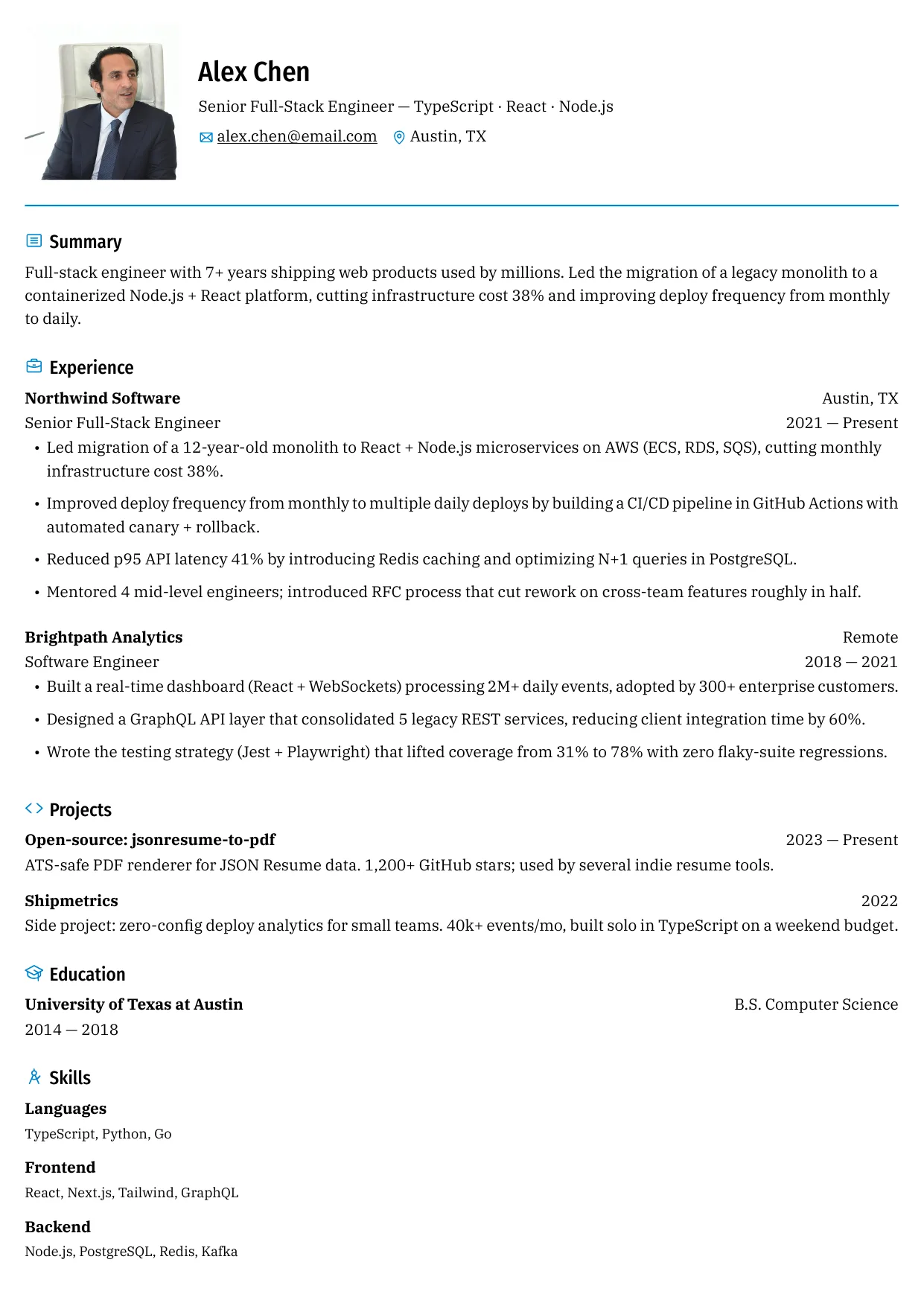
Example resume
A plain single-column resume in this template: standard headings, dates in month and year, grouped skills and no content inside images or tables. Switch layouts in the builder and export PDF or DOCX — free, and nothing is uploaded.
Showing 3 of 15 free templates — open the builder to browse every layout. All 15 are free.
Formatting that breaks parsing
- Tables used as a layout grid, which can arrive as cells in the wrong order and split a job title from its dates.
- Text boxes and shapes holding the contact block, the skills list or a licence number.
- Page headers and footers for anything that matters — many systems drop both regions before reading the body.
- Image-based PDFs, where a scan or an exported graphic contains no text layer at all.
- Two-column layouts that interleave the columns during extraction, so a role from 2016 appears between two bullets from 2024.
- Dates written as months only, or replaced with a duration like “three years”, which leaves tenure uncomputable.
How to test a resume before you apply
Run the export through a structural check rather than trusting how it looks on screen. ShitResume includes a free ATS checker that reads your PDF in the browser and reports what it can extract: whether the contact block was found, whether the dates parse, which headings were recognised and where the layout could be flattened. Because the file never leaves your device, you can run it as often as you like while editing, and the checker's suggestions can be applied before the document goes anywhere near an employer.
Common ATS myths worth ignoring
- “You must use a Word file.” Portals accept Word, PDF and sometimes plain text; the requirement is a readable text layer, not a specific extension.
- “Hide keywords in white text.” Keyword stuffing is visible to any human who opens the file and is a reason to reject an application, not a shortcut past a filter.
- “It must be one page.” Length is a human preference. A parser does not care whether the history runs to two pages; it cares that the structure is linear.
- “The best resume scores 100%.” A score is a product of one checker's rubric. What matters is that your real experience is extracted accurately and matches the posting's terms.
- “A creative layout will be auto-rejected.” Modern systems handle most single-column designs; the risk is the specific pattern — tables, text boxes, image text — not colour or typography.
- “You need to trick the system.” The system is a filing cabinet. The goal is to be filed under the right fields so a recruiter can find you.
The layouts on this page are three of the templates ShitResume ships, and all of them keep the document text-first so an export stays readable. ShitResume runs in the browser and stores the resume on your device, which means you can export, test and revise without uploading a file anywhere. No layout is locked and no download is held back: the whole set and the PDF or DOCX files stay free, and you never have to create an account.
Skills and keywords for this role
Use the terms that genuinely describe your work — an interviewer will ask about anything you list.
- Structure: single column, reverse-chronological experience, real bullet lists
- Headings: Summary, Experience, Education, Skills — the names parsers look for
- Text: selectable PDF, body at 10.5pt or larger, no text inside images
- Dates: month and year on every role, one format throughout
- Contact: in the body of the page, never in a header, footer or text box
- Export: PDF for applications, DOCX only when a portal asks for an editable file
Frequently asked questions
What makes a resume ATS-friendly?
A readable text layer, one main reading column, standard section headings and dates in a consistent month-and-year format. Keep contact details, skills and licences in the body of the page rather than in tables, text boxes or page headers, and check that the exported file lets you highlight a line of text.
Is a single-column template better than a two-column one?
For older systems and large employers, yes — a single column cannot be interleaved during extraction. Most modern platforms handle a sidebar correctly, so a two-column layout with skills on the side is usually fine. The pattern to avoid is dates and titles split across two columns, which can reorder your history.
Should I upload a PDF or a DOCX?
Choose the PDF for most applications, and switch to an editable file only when a portal or a recruiter asks for one. A PDF locks the layout and still carries selectable text when it is exported properly. Keep a DOCX for portals that parse Word files directly.
Can I include a photo or a designed header?
In markets where a photo is expected, keep it as a small image outside the text flow. Where it is not expected, leave it out — it adds nothing a parser can use and can invite bias. A coloured header band is fine as long as your name and contact details are also plain text in the body.
How do I check my resume before applying?
Use the ATS checker linked below. It reads the PDF in your browser, reports which sections and dates it can extract, and flags the layout patterns that commonly cause text to be dropped. Nothing is uploaded, so you can test a draft and keep editing without leaving a copy anywhere.
Do keywords have to match the posting exactly?
Match the terms you can honestly claim, using the posting's wording: if it says “stakeholder management”, do not write “worked with stakeholders”. Expand an acronym once and then use the short form, so both spellings exist in the document. Accuracy still matters more than density.