ATS Checker
Built for ATS. Designed for humans. Upload a resume and see what an applicant tracking system reads from it. Everything runs in this browser — your file is never uploaded, and nothing is stored.
What a person sees
What a parser reads
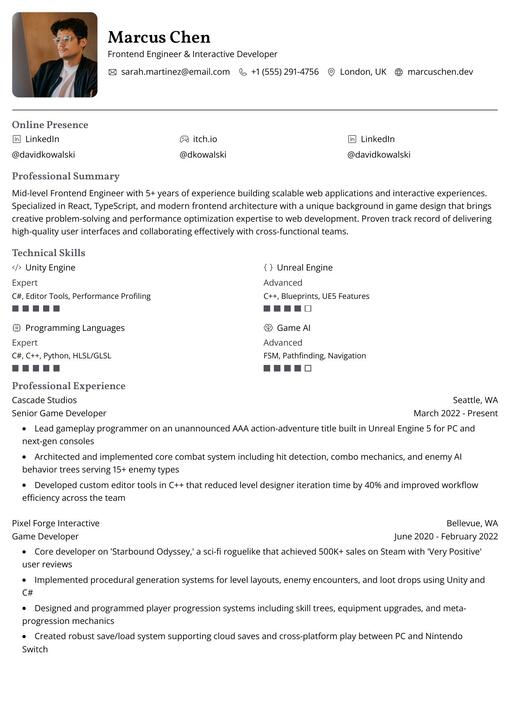
- NameMarcus Chen
- HeadlineFrontend Engineer & Interactive Developer
- LocationLondon, UK
- Phone+1 (555) 291-4756
- SectionsSummary, Skills, Experience
- DatesMarch 2022 - Present
What an applicant tracking system does with your file
An ATS stores applications and makes them searchable. To do that it has to turn your PDF into structured fields: name, contact details, employers, dates, education, skills. Everything a recruiter does afterwards — searching, filtering, forwarding — works on those fields, not on the layout you spent an evening on.
Parsing is where documents break. Text that is really an image (a scan, or a PDF exported as a picture) yields nothing. Multi-column layouts can be read across rather than down. Tables, text boxes and content in the page header or footer are often dropped or attached to the wrong record. A contact line that lives in a design element rather than the body text is the classic way to lose a phone number.
What an ATS usually does not do is reject you automatically. Human review decides most outcomes; the software decides whether a human can find you. That is the thing worth testing, and it is the only thing this checker reports on.
How to run the check
- Export the resume you would actually send — a PDF, exported the same way you export it for an application. This page reads PDFs only, and decides the format from the bytes rather than the file name.
- Drop it into the checker above. The file is opened by code running in this tab; it is never uploaded and nothing is stored.
- Read the findings as a list of places where the text could not be read the way a person would read it. Each one names the element and its position, so you can go straight back to that part of the resume.
- Fix, re-export, run it again. If you have the posting you are applying to, paste it in to see which of its terms already appear in your text.
Making a resume readable, in order of impact
- Keep the layout single-column. Two columns can be read across, interleaving both sides into nonsense. See resume formats.
- Use the headings a parser expects — Experience, Education, Skills — rather than creative labels it has to guess at. The skills section guide covers what belongs in one.
- Put contact details in the body text, not in a header or a text box. This is the single most common way a phone number or email goes missing.
- Keep dates in one format and in one place per role. The reverse-chronological layout covers date handling in detail.
- Mirror the posting's vocabulary where it is honest— the same tool named the same way. Resume keywords explains how to do that without stuffing.
- Stay near two pages. Length is a human constraint more than a parsing one, but a bloated document makes both worse — see resume length.
Frequently asked questions
Will an ATS reject my resume automatically?
Rarely. Most applicant tracking systems store and search applications; a human decides. The software can only cost you an opportunity when it fails to read your text — which is what this checker tests.
Is my resume uploaded when I run the check?
No. The PDF is opened by code running in your browser tab. Nothing is uploaded, nothing is stored, and no account is needed.
Which file formats does the checker accept?
PDF only, and the format is decided from the file's bytes rather than its extension. Export the same PDF you would send to an employer; a DOCX export exists for applications that ask for one, but it is not what this page reads.
Why does the checker say my PDF is an image?
The file has no text layer — it was scanned, or exported as a picture by a design tool. An ATS sees the same thing: no text. Export again from the editor that made it, or from this app, so the text is selectable.
Does the checker give me a score?
No. A single number would hide what actually matters, which is which parts of your resume could not be read. The report lists those places instead, and you fix them.
Can it check my resume against a specific job posting?
Yes. Paste the posting into the checker and it reports which of its terms already appear in your resume text, so you can decide where the wording is honestly missing.
Is the checker free, and do I need an account?
It is free and needs no account. The resume builder it belongs to is also free: build, export and check without signing up.
