Resume Keywords: How to Find and Use the Right Ones
An ATS does not understand your achievements — it matches terms. Resume keywords are the specific words a posting uses for the tools, skills, credentials and titles it wants, and the goal is to use them where they honestly describe your work. This guide covers a four-step method for finding them, where each one belongs on the page, and the difference between matching a job description and stuffing it.
Free forever. No account, no card, no catch — your data never leaves your device.
Keywords are the posting's words, not your thesaurus. When a job description says “experience with Tableau and SQL,” the ATS — and often a human — is looking for those strings. A resume that says “data visualisation tools” and “database querying” may describe the same skills and match nothing. The fix is mechanical: find the posting's exact terms, verify you honestly have them, and place them where keyword matching actually reads.
Step 1: Extract the keyword list from the posting
- Copy the posting into a document and highlight every item that could appear on a resume: tools (Salesforce, Python, Excel), methods (forecasting, triage, lesson planning), credentials (CPA, RN, PMP), job titles, and industry terms.
- Mark the must-haves. Requirements in the “required” section and anything repeated get top priority; “nice to have” items get second.
- Ignore the noise. Company history, benefits, EEO statements and culture paragraphs contain words you should not match — “fast-paced environment” is not a keyword.
- Expect 10–20 real keywords from a typical posting. That is your checklist, not a quota to hit at any cost.
Step 2: Sort keywords into the four resume slots
- Job title → headline. If the posting's title is “Operations Analyst,” use that exact title in your headline where it honestly describes you. Many systems match the title first.
- Top skills and tools → summary. The two or three highest-priority terms belong in the opening 2–4 lines, where both parsers and humans start.
- Everything confirmed → skills section. The grouped list is the keyword surface: 4–6 categories, the posting's exact wording, no decoration.
- Proof → experience bullets. Every priority keyword should appear at least once inside a bullet doing real work — “Built the weekly report in Power BI…” — because that is what makes the claim credible to a human.
Step 3: Match exactly, then add the common variant
- Use the posting's spelling and form as the primary entry: if it says “PostgreSQL,” write PostgreSQL (you can also write “Postgres (PostgreSQL)” but not instead of it).
- Spell out acronyms once: “search engine optimization (SEO),” then use the short form. Tokenizers differ in which version they index.
- Do not stack synonyms. “Microsoft Excel / MS Excel / Excel spreadsheets” in one line is stuffing; pick the posting's term and the one you would naturally use.
- Language variants matter in localised postings: “currículum” versus “CV,” “organización” versus “organization” — match the posting's language and variant.
Step 4: Check the density honestly
There is no magic keyword percentage, and no truthful resume needs one. The practical test: for each must-have keyword, can you find it twice on the page — once in the summary or skills block, once inside an experience bullet? If yes, the resume is matched without being stuffed. If a keyword appears five times in the skills list and nowhere else, it reads as padding and proves nothing.
- Count coverage, not frequency. 12 of 15 posting terms covered honestly beats 40 mentions of 6 terms.
- Read the page aloud. If a sentence exists only to hold a keyword, cut the sentence and keep the keyword where it fits.
Keyword stuffing: the tricks that backfire
- Hidden text. White font, tiny type, text behind an image. Parsers extract it, recruiters can too, and “resume fraud” is treated accordingly by employers.
- Pasting the job description. A skills block that mirrors the posting's responsibilities verbatim signals one thing: the applicant had nothing to say.
- Keywords you cannot discuss. Every listed item is an invitation to an interview question. Kubernetes listed once in 2021 is a trap you set for yourself.
- One keyword list for every application. The point is targeting; a static list is just a slower way to be generic.
Where to start for common roles
If you are working from a blank page, the role guides in this site list the actual keywords hiring managers screen for, per role — software engineer, registered nurse, executive assistant, account manager, warehouse associate, and 70 more. Start from the closest guide, then trim to the posting in front of you.
Resume keywords example
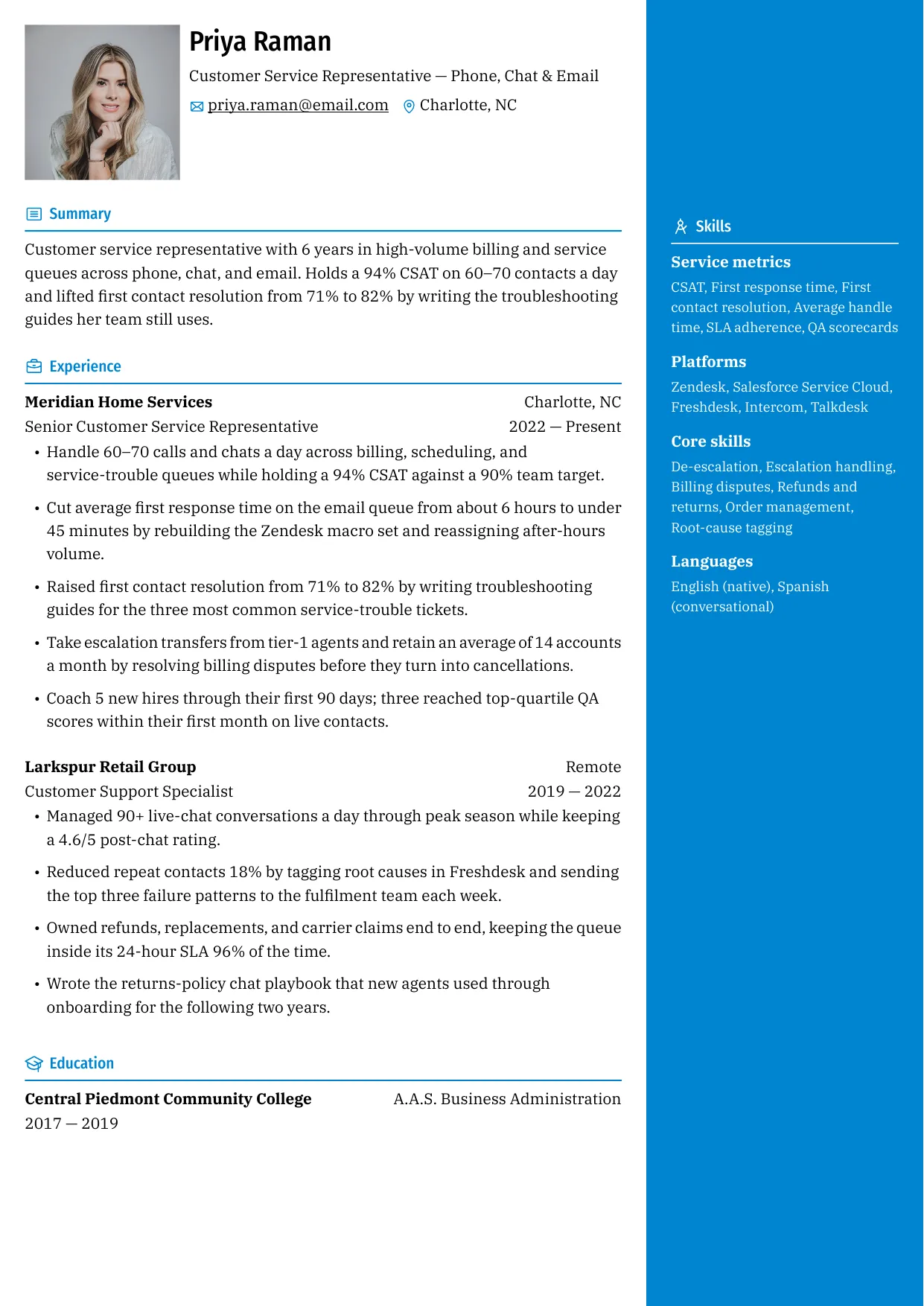
The example below shows a properly matched resume: the headline carries the target title, the summary opens with the posting's top terms, the skills section is the keyword list, and every claim is demonstrated in the bullets beneath.
Example resume
A one-page, ATS-matched resume. Export PDF or DOCX with the same plain-text structure, no account needed.
Showing 3 of 15 free templates — open the builder to browse every layout. All 15 are free.
Test your match in five minutes
- List your ten highest-priority keywords from the posting.
- Use your browser's find function on your resume (PDF) for each one — exact spelling.
- Mark every miss; for each, either add it where it is honest or accept the gap consciously.
- Check placement: title in the headline, top terms in the summary, all of them in skills, the important ones in bullets.
- Run the structure past a checker to confirm the format does not matter — single column, no tables, selectable text.
Format is the quiet partner of keywords: the right terms in a document the parser cannot read score zero. ShitResume keeps every resume a single linear text block, so the terms you matched are exactly the terms the system extracts.
Skills and keywords for this role
Use the terms that genuinely describe your work — an interviewer will ask about anything you list.
- Extract: highlight every tool, skill, credential and title in the posting — that is the target list
- Classify: must-have requirements first, nice-to-haves second; ignore benefits and boilerplate
- Place: title in the headline, top terms in the summary, grouped list in skills, proof in experience bullets
- Frequency: each high-priority keyword twice — once in skills, once in a summary or bullet — is the practical rule
- Mirror exactly: “Power BI” not “BI tools”; “customer success” not “client happiness”; use the posting's spelling
- Never: hidden white text, whole-JD pasted into the skills block, or keywords you cannot discuss in an interview
Frequently asked questions
What are resume keywords?
The specific words a job posting uses for the tools, skills, credentials, titles and industry terms it wants — for example “SQL,” “customer success,” “CPA,” “forklift certification.” ATS software matches a resume against those terms, so using the posting's exact wording where it honestly describes you is the core of keyword optimisation.
How many keywords should a resume have?
A typical posting yields 10–20 real keywords. Cover the must-haves honestly and place each high-priority term in two places (skills section plus a summary or bullet). There is no benefit to listing 40 terms: coverage of what you can defend beats raw frequency every time.
Where should keywords go on a resume?
Four slots: the exact target title in the headline, the top two or three terms in the summary, the full confirmed list in the grouped skills section, and proof of the important ones inside experience bullets. That distribution satisfies both the parser (which reads sections) and the recruiter (who needs evidence).
Do I need to repeat keywords multiple times?
Twice per high-priority keyword is the practical rule — once in the keyword surface (summary or skills) and once in an experience bullet where the skill did real work. Beyond that, repetition adds nothing and starts to read as stuffing. Coverage of different honest keywords is worth more than frequency of a few.
Is keyword stuffing worth it to pass the ATS?
No. Hidden text, pasted job descriptions and synonym stacking are detected, and the downstream costs — recruiter suspicion, interview questions you cannot answer — are worse than the missed match. Modern screening is a first filter, not the judge; the human stage reads for evidence, and stuffed resumes fail there.
How do I find keywords if the posting is vague?
Use the role itself as the source: standard tools, credentials and methods for that job (start from the role guides on this site), plus the company's own language on its careers page and in similar postings by competitors. When the posting is thin, the industry's default vocabulary is the best available target.