Administrative Assistant Resume
The job title “administrative assistant” hides the scale behind it. This guide shows how to make that scale visible — who you support, how much you coordinate, how much money you control — with a complete example, the sections recruiters look for, and formatting that survives a parser.
Free forever. No account, no card, no catch — your data never leaves your device.
What an administrative assistant resume must include
- A headline naming the level you work at — “Administrative Assistant,” “Executive Assistant,” “Office Coordinator.” Level and scope separate two resumes with the same title.
- Scope in the first three lines: how many people you support, at what seniority, in how many locations.
- Volume wherever you can produce it honestly: meetings booked, trips arranged, reports processed, events run.
- The software you use, spelled the way employers search for it — SAP Concur, not “expense software.”
- One line on confidentiality, if your work covered board papers, personnel files or anything under an NDA.
Most administrative resumes fail the same way: they list duties (“answered phones, scheduled meetings, ordered supplies”) and leave the reader guessing at the size of the job. Whoever reads your resume has never seen your office, so the numbers they cannot infer are the numbers you have to state.
Administrative Assistant Resume Example
Example resume
A one-page administrative assistant resume with scope stated up front. This is the structure our builder produces — switch templates, export PDF or DOCX, no account needed.
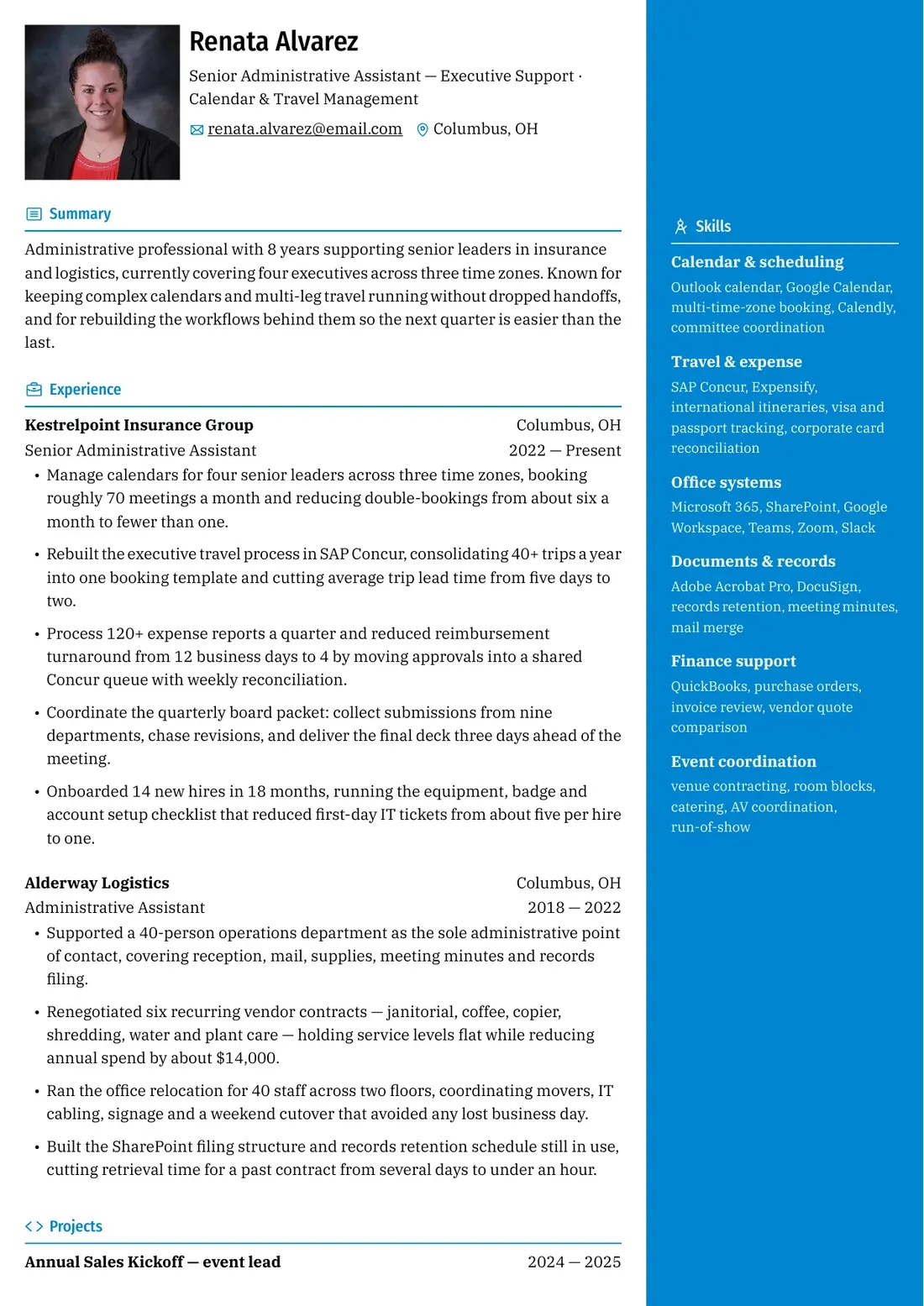
Showing 3 of 15 free templates — open the builder to browse every layout. All 15 are free.
Recommended sections for an administrative assistant resume
- Summary — years of experience, who you support, two strongest numbers. Three lines max.
- Experience — reverse-chronological. Open each role with a line of scope, then three to five achievement bullets.
- Core competencies — a compact keyword block: scheduling, travel, expense, records, events.
- Technical skills — the software you use, grouped by function, naming the product not the category.
- Education — degree, school, year. Add a recent office-administration certificate if you have one.
- Certifications — optional, but a real tie-breaker at executive level.
How to write administrative bullet points
Each bullet should carry one number and one improvement. The number supplies the scale, the improvement supplies the judgment. A bullet with only an action reads like a job description; a bullet with only an adjective reads like a claim.
- Weak: “Responsible for managing calendars and scheduling meetings.” — no scale to compare against.
- Strong: “Manage calendars for four senior leaders across three time zones, booking roughly 70 meetings a month and cutting double-bookings from six a month to fewer than one.”
- Weak: “Handled travel arrangements.” — true of nearly every administrative role.
- Strong: “Rebuilt the travel template in SAP Concur, consolidating 40+ trips a year and cutting lead time from five days to two.”
- Strong: “Renegotiated six recurring vendor contracts, holding service levels flat while cutting annual spend by about $14,000.” — money is your most concrete number.
Core competencies and keywords (2026)
Administrative postings are long lists of requirements, and keyword matching against them is literal. Reuse the posting's wording for the work you genuinely do — in the competency block and in your bullets, not only in a skills line at the bottom.
- Scheduling: calendar management, multi-time-zone coordination, committee meetings, agenda preparation
- Travel: itinerary planning, flight and hotel booking, ground transport, visa tracking, policy compliance
- Expense and finance: SAP Concur, Expensify, card reconciliation, purchase orders, invoice review, budget tracking
- Records: meeting minutes, action item tracking, document control, retention schedules, filing systems, mail merge
- Office operations: reception cover, mail and courier handling, supplies inventory, visitor management
- People support: new hire onboarding, equipment and badge setup, interview scheduling, team events
- Events: venue contracting, room blocks, catering, AV coordination, run-of-show, post-event invoicing
ATS formatting notes for administrative roles
- Use the posting's job title, or the closest honest equivalent, in your headline — parsers match titles literally.
- Keep dates beside each job title on the same row, in one format throughout; mixing “Jan 2022” and “01/2022” makes a parser guess.
- Write each employer, title and location as plain text, never inside a graphic or table cell.
- Drop skill-rating graphics: a parser keeps the label and discards the bar, so “Excel 60%” arrives as “Excel.”
- Check two-column templates with a sidebar beside your work history. Many parsers read the sidebar first, so your skills arrive before your jobs.
None of this changes what you write, only whether it survives the trip. A resume is parsed before it is read, and formatting that vanishes in that step cannot be recovered by better wording — which is why every template here shares one linear structure, so the order you write is the order a parser receives.
ShitResume treats layout as a parsing problem rather than a design contest. Every template is built on one linear document structure, so the multi-time-zone calendars, the SAP Concur trips and the board-packet deadlines you list reach the reader in the same order they appear on your screen — and the same order they land in the PDF or DOCX. It is completely free to build and export, with no account to open first.
Certifications worth listing
Administrative roles rarely require a certification, and none substitutes for experience. They help when you are moving to a corporate office, changing industries, or competing against a longer track record. Confirm current details with the issuing body before paying.
- PACE (Professional Administrative Certification of Excellence) — the certification IAAP, the field's main professional association, offers as the successor to its older CAP and CPS designations.
- Microsoft Office Specialist (MOS) — per-application exams for Word, Excel, Outlook and PowerPoint, worth listing when a posting names a tool at an advanced level.
- Certified Meeting Professional (CMP) — from the Events Industry Council. Relevant only if event coordination is central; it carries experience requirements.
- Associate's or bachelor's in business administration or office management — the most common formal requirement, though many employers accept equivalent experience.
- Notary public commission — a short state-issued appointment, not a career credential, but useful in legal, real estate and financial offices. Rules vary by state.
Nothing in ShitResume is sold, gated or metered — the templates and the exports are simply free. Nothing you type — executive names, travel itineraries, vendor spend — is sent anywhere, because the document is assembled in the browser and your data stays there. No account, no card, no trial that quietly ends. Keep the office running; the resume can run itself.
Skills and keywords for this role
Use the terms that genuinely describe your work — an interviewer will ask about anything you list.
- Calendar & scheduling: Outlook, Google Calendar, multi-time-zone booking, Calendly, committee meetings
- Travel & expense: SAP Concur, Expensify, itineraries, visa tracking, corporate card reconciliation
- Office systems: Microsoft 365 (Word, Excel, PowerPoint, SharePoint, Teams), Google Workspace, Zoom, Slack
- Documents & records: Adobe Acrobat Pro, DocuSign, retention schedules, meeting minutes, mail merge
- Finance support: QuickBooks, purchase orders, invoice review, vendor quotes, budget tracking
- Event coordination: venue contracting, room blocks, catering, AV, run-of-show, invoicing
Frequently asked questions
How long should an administrative assistant resume be?
One page is the norm, and usually achievable because the value sits in numbers rather than volume. A tight second page is fine if you have held genuinely different kinds of role — front desk, then executive support. Padding dilutes the numbers that make you stand out.
My job title sounds generic. How do I show what I actually do?
Describe scope in the first line under each job: who you support, how many, and where they sit. “Supported a 40-person operations department as the sole administrative contact” says far more than the title. Let the bullets carry the volume.
What certifications should an administrative assistant list?
Only current, relevant ones. PACE from IAAP is the main professional credential; Microsoft Office Specialist exams help when a posting names a tool at an advanced level; CMP suits roles where event coordination is central. None replaces experience.
Should I list my typing speed and software versions?
Typing speed earns one line only if a posting asks or your speed is genuinely high. Software versions are not worth listing: write “SAP Concur,” not a version number, which dates the moment the employer upgrades.
How do I explain a gap in administrative work experience?
Name it briefly and move on, in the same reverse-chronological format as everything else. A one-line entry such as “Career break — family care, 2023 — 2024” is enough; unexplained gaps invite worse assumptions. If you kept a hand in — volunteering, bookkeeping — add it so the section reads as continuous.
How should I show confidentiality and discretion on a resume?
State the category of material you handled, never the content. “Prepared board papers and personnel files under standing confidentiality agreements” is verifiable; naming a specific deal or person breaches the trust you are claiming.